Six apps are ready to download today: EasySign, EasyPDF, EasyClip, EasyFile, EasyTouch and EasyGuard. EasyNote, and Easy Suite with every app in one, are coming soon.

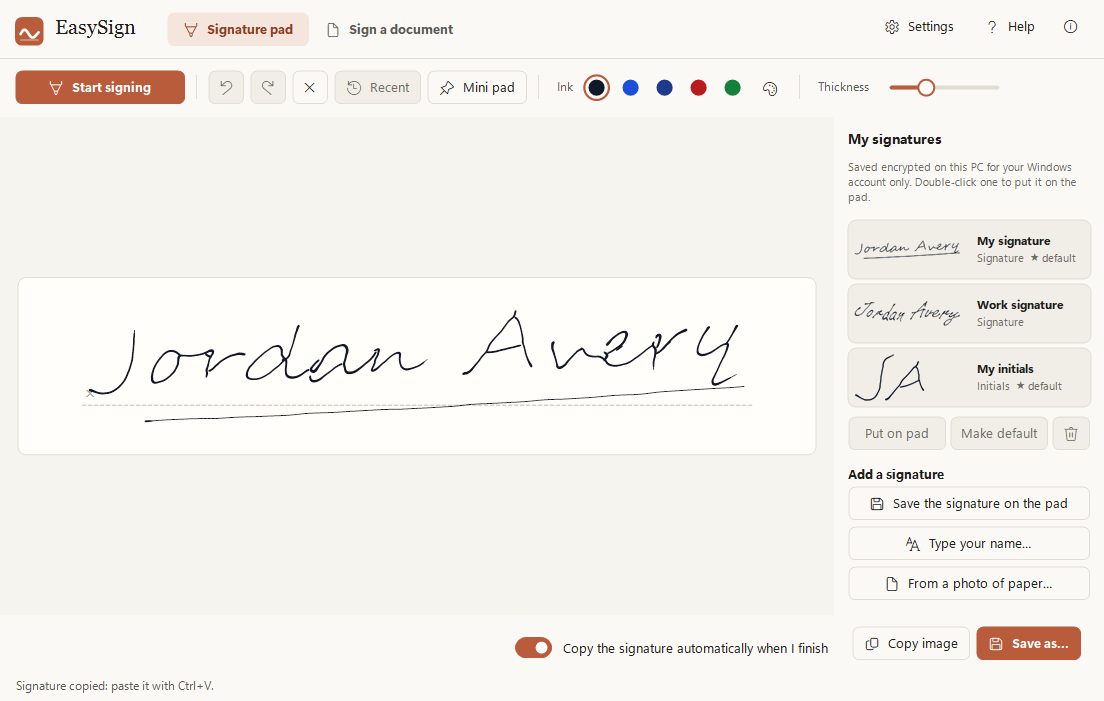
EasySign
Available · version 1.5.4
Sign with your finger, right on your laptop.
- Your touchpad becomes a signature pad. No printer, no scanner, no phone.
- Sign PDFs and photos of forms, add the date, and save a signed copy.
- No touchpad? Type your name in a handwriting look, or use a mouse or pen.
EasyPDF
Available · version 2.0.1
Everything you do to a PDF, in one window.
- Merge, split, reorder and rotate pages. Turn photos into a PDF.
- Fill in forms by typing: it finds the blanks for you. Highlight, add text, shapes and drawings.
- Make PDFs and photos small enough for one email.
- Check before sending: finds text hidden under black boxes and makes a safe copy.
EasyClip
Available · version 1.2.0
Everything you copied, and every screenshot, one shortcut away.
- Press Ctrl+Alt+V for your clipboard history and saved snippets.
- Screenshots with arrows, boxes, steps, blur and redaction.
- Passwords and card numbers you copy are wiped after 30 seconds.
EasyFile
Available · version 1.1.1
Paper in, tidy files out.
- Scan pages with your webcam: edges found and straightened for you.
- Names files by what is inside, like "2026-09 Quill Energy Invoice QE-1024.pdf".
- Works on scans, PDFs and photos of documents.
EasyTouch
Available · version 1.0.2
Your touchpad can do much more.
- Write letters and numbers with your finger.
- A number pad and shortcut gestures on the touchpad.
- A pen for drawing on your screen during calls and lessons.
EasyGuard
Available · version 1.0.0
Someone looking over your shoulder? The screen blurs.
- Notices a second face in front of the webcam.
- Always starts switched off. You decide when it watches.
- Nothing is recorded or saved, ever.
EasyNote
Coming soon
Records your meetings and writes down who said what.
- Records your microphone and the call as two sides: You and Others.
- The transcript is written on your PC. Nothing is sent anywhere.
- Search it, and save it as text, subtitles or a Word document.
EasyPaint
Coming soon
Draw and paint, even with your touchpad.
- Press Space and your laptop's touchpad works like a pen.
- Smooth brushes in every colour. A mouse or a drawing pen works too.
- Your pictures stay on your PC.
Easy Suite
Coming soon
Every Easy Suite app, in one app.
- Everything the seven apps do, in a single app with one window.
- One install and one icon, instead of seven apps on your PC.
- Rather have just one or two? The single apps stay here too.